
You Can Check the Company Evaluation in an Instant.
- TOP
- Our Services
- e-Credit Navigator
- You Can Check the Company Evaluation in an Instant.
You can see the subject company's risk of bankruptcy at a glance!
We automatically calculate the recommended credit limit that suits you.
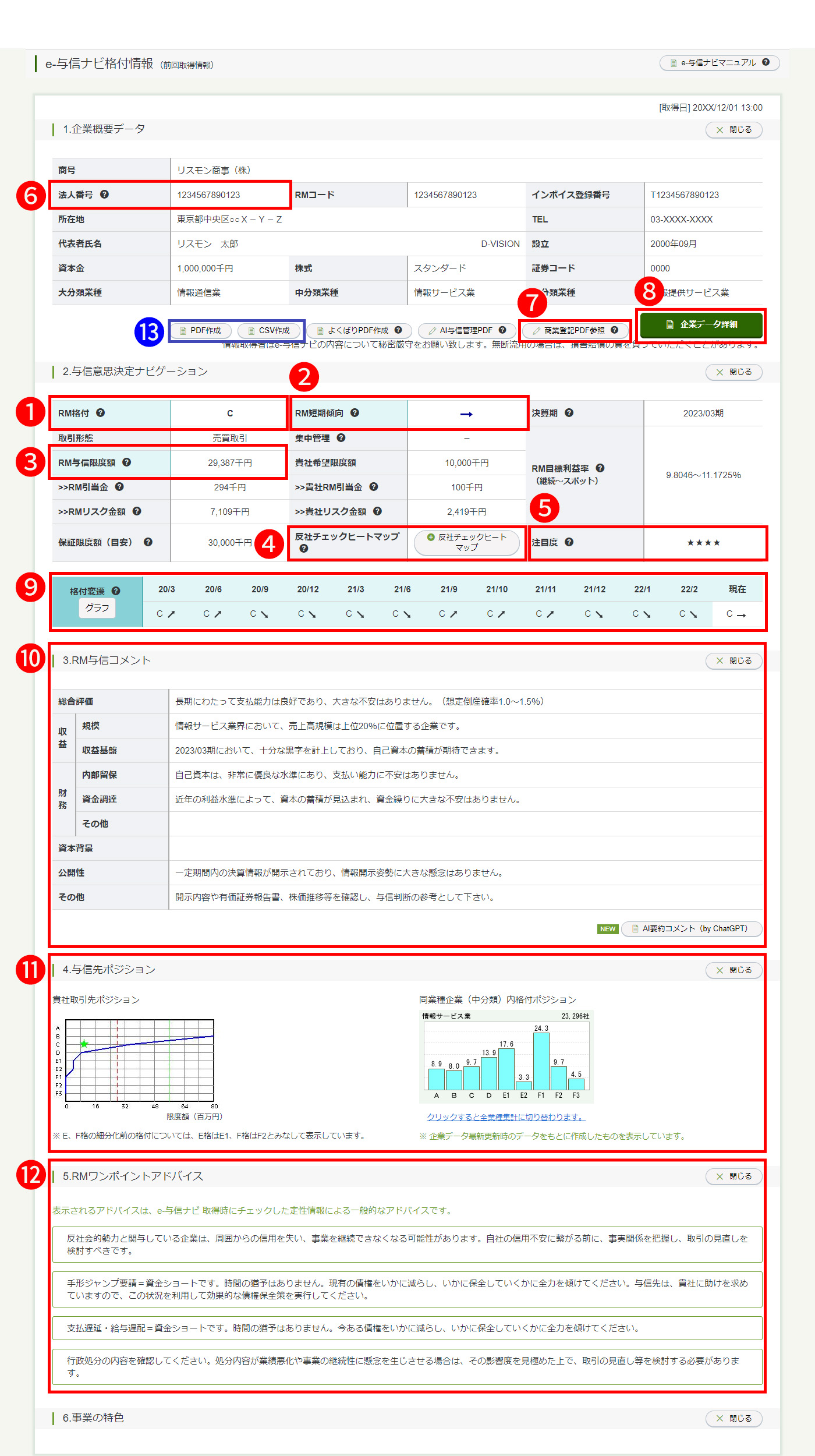
e-Credit Navigator Rating Information Screen
※Click the image to enlarge or reduce it. Clicking anywhere other than the image will end the enlarged / reduced display.
- RM Rating
We show you the latest ratings supported by the RM Rating Bankruptcy Record. Low ratings E and F, which are
close to bankruptcy, are subdivided into two and three levels, respectively, and they are indicated in nine levels
in total. - RM Short-term Trend
We provide short-term positioning within the rating with a five-level arrow notation. We show them to you with
consideration given to trends in quantitative information, such as business performance, trends in qualitative
information that do not appear in figures, and additional information from an analysis of special information. - RM Credit Limit
We calculate the credit limit with our own unique logic, based on your financial strength, the creditworthiness
and size of your business partners, and the status of transactions. - Anti-social check heat map
RiskMonster's unique compliance information is used to display risks such as information related to antisocial forces, litigation issues, and administrative sanctions in a heat map. Newspaper articles from the past 10 years can also be searched at the same time.
- Attention level
We provide the numbers from the last three months of clicks on e-Credit Navigator for the search target
companies and of the companies registered for monitoring by other companies in the e-Management File.
We show you the attention level according to the numbers in four levels with symbols from ★ to ★★★★. - Corporate Number
We provide the 13-digit corporate version of My Number that has been collected and identified at RiskMonster.
- Commercial registration PDF
We will provide you with the latest PDF of the commercial register held by Risk Monster. If there are any changes to the commercial register within one year after acquisition, you will be notified by email, and you will be able to view the PDF of the commercial register after the changes.
- Company data details
In addition to the latest company information, we provide a wealth of information, including financial statements and change history for more than the past five periods, as well as information on business partners and group companies.
- History of RM Rating
We provide the history of RM Ratings for the past for two years up to the time you searched for the RM Rating.
You can see the trend in the credit status in chronological order. - RM Comment on credit
In addition to a comprehensive evaluation, we also provide factors on rating analyses and advice and points to
check for making credit decisions regarding profitability, financial aspects, capital background, openness, etc. - Position of your business partners
From the distribution status, you can visually check the position among your business partners of the business
partner you have currently searched. - RM One Point Advice
By checking the box on the qualitative checklist, you can see the points to note on credit management that
reflect the creditworthiness of the search target. - Output Function
We offer two types of output functions: "PDF creation" and "CSV creation." These can be used to share information within your company or as data to import into your company's system.